Scope
by Augmentl Studio
One operational surface for electronic artworks deployed globally, including the portal network. Built by the person already helping keep them running.
scroll

Konstruktiv Controller
Context
We did have a remote-management app, but it only touched the control hardware layer.
-
Mostly a Controllino view
It was mainly a window into the control hardware layer: heartbeat, two temperature probes, and a narrow firmware/control picture. -
Nuclear recovery path
In practice it was mostly used to check whether the portal was alive and try to bring it back with boot, shutdown, or reboot controls. -
No display stack access
It could trigger a blank state, but not the actual LED stack: no NovaStar brightness control, no panel telemetry, no display health reasoning. -
Some AC controls, but weak in practice
It also exposed AC controls, but these were limited and not reliable enough to count as a real operating layer. -
Being retired during the transition
It remains available only as a stopgap while Scope takes over, because it never expanded beyond the narrow control layer the network actually needs.
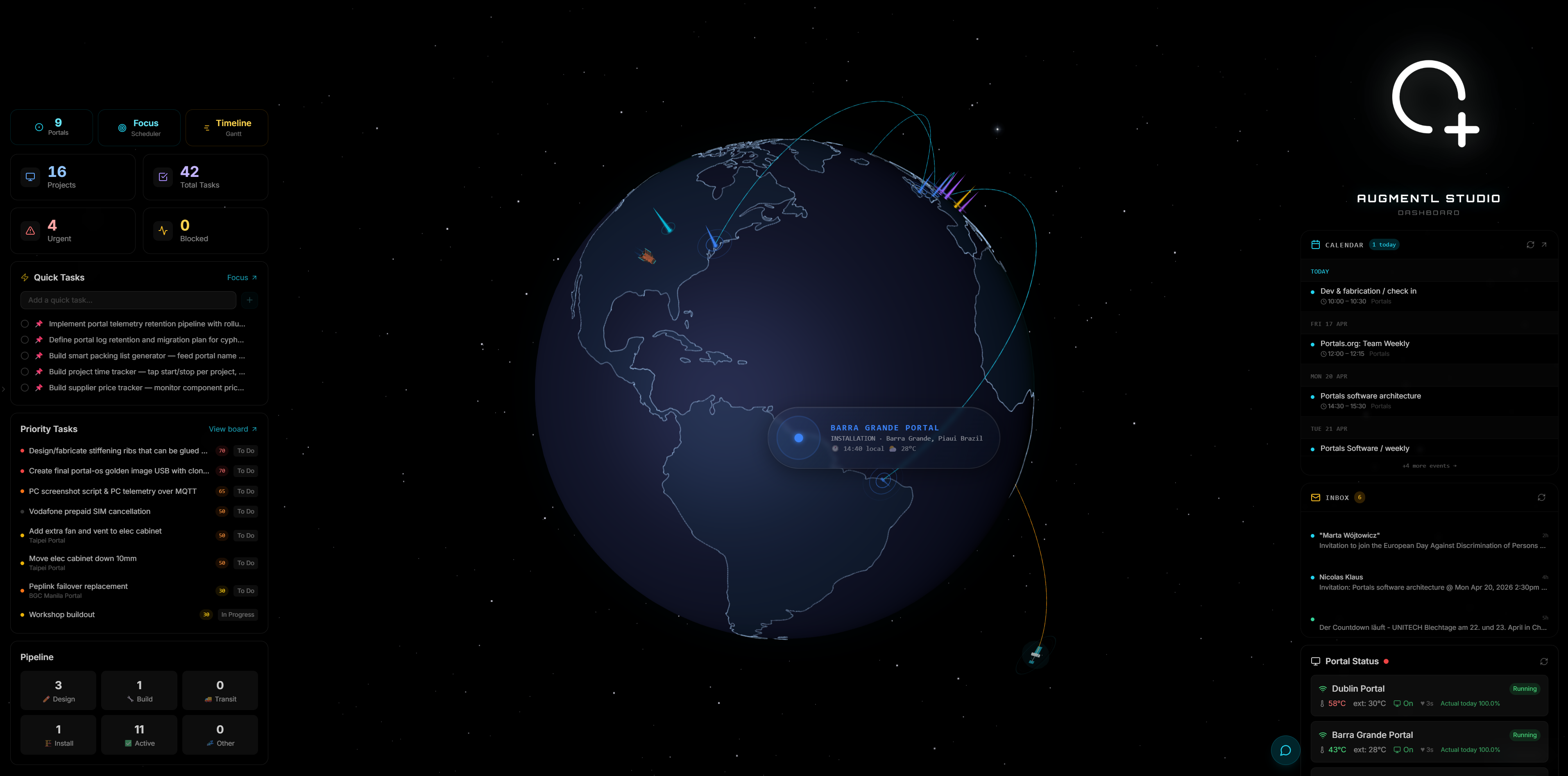
Augmentl Dashboard · operations view across portals, projects, tasks, calendar, and inbox
Dashboard layer
Augmentl Dashboard matters because the app is not the whole operating surface.
- Fleet view, not single-portal view
The controller tells you what is happening at one installation. The dashboard tells you what is happening across the fleet, where attention is needed, and how sites compare. - Operations layer around the portals
Projects, tasks, priorities, calendar, inbox, and portal status all sit around the runtime layer. That is essential for actually operating a network, not just observing one site. - Useful to Augmentl and to Portals
Augmentl needs the broader operating surface. Portals could also have a portal-team-specific dashboard variant that only shows the portals layer, without the rest of the internal workspace. - Complements the app instead of duplicating it
The controller is the deep per-portal action surface. The dashboard is the portfolio, planning, and operations surface around it.
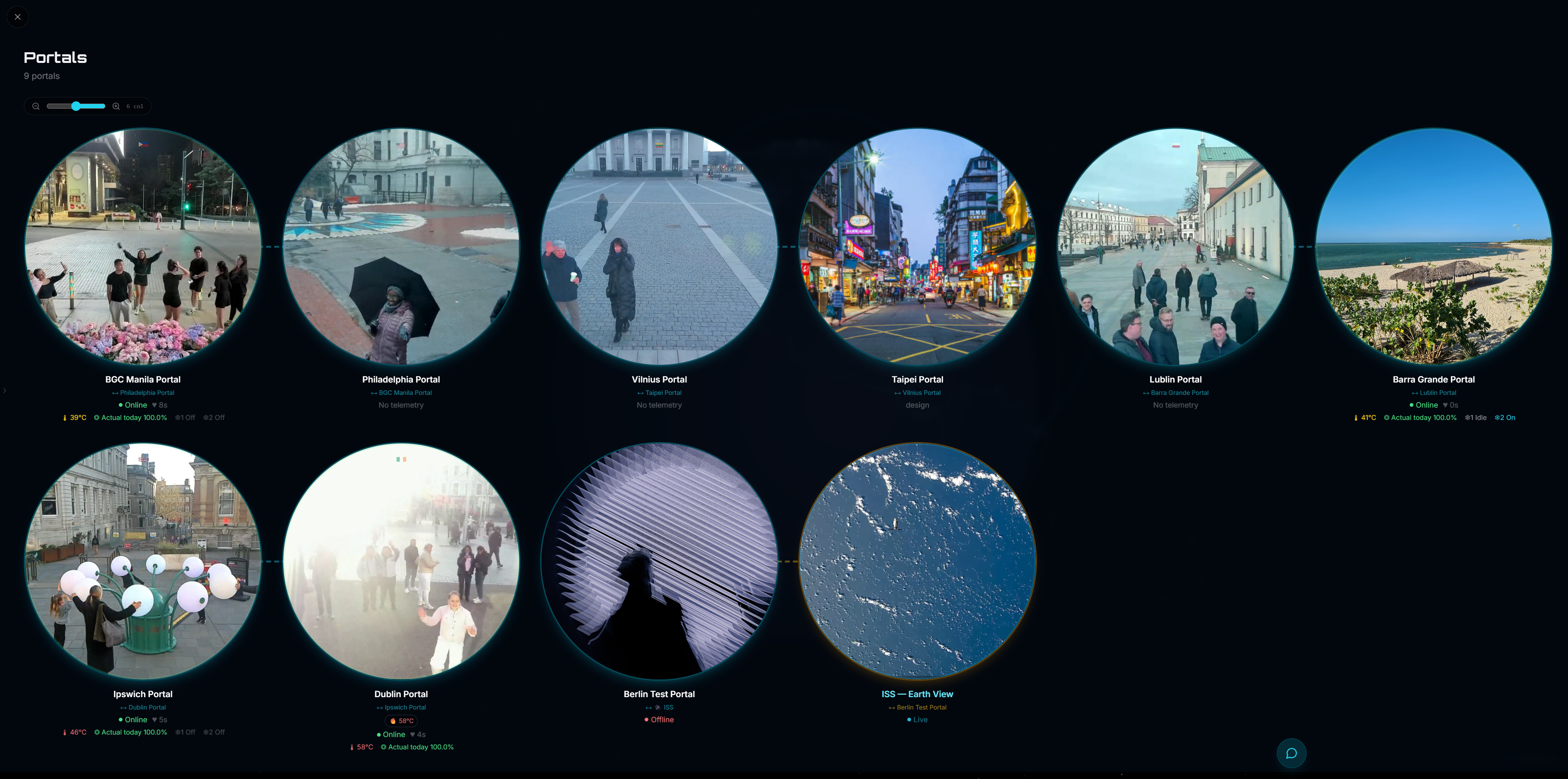
Portal-team-specific dashboard variant · portals-only network view
Portals-only variant
The same system can expose a dedicated portals dashboard without the rest of the Augmentl workspace.
- Only the portal network surface
Status, pairings, uptime, telemetry presence, offline nodes, and live visual state can all be shown in one clear portal-team view. - Useful for shared operations
It gives Portals a clean operational surface for the network without requiring access to broader project, inbox, or internal coordination layers. - Good basis for scoped access
This same partitioning is what later makes client-facing or portal-team-specific access realistic, because the data is already separated into appropriate surfaces. - Same backend, narrower front-end
The point is not another product. It is a narrower view of the same product, tuned for the portal team’s actual day-to-day needs.
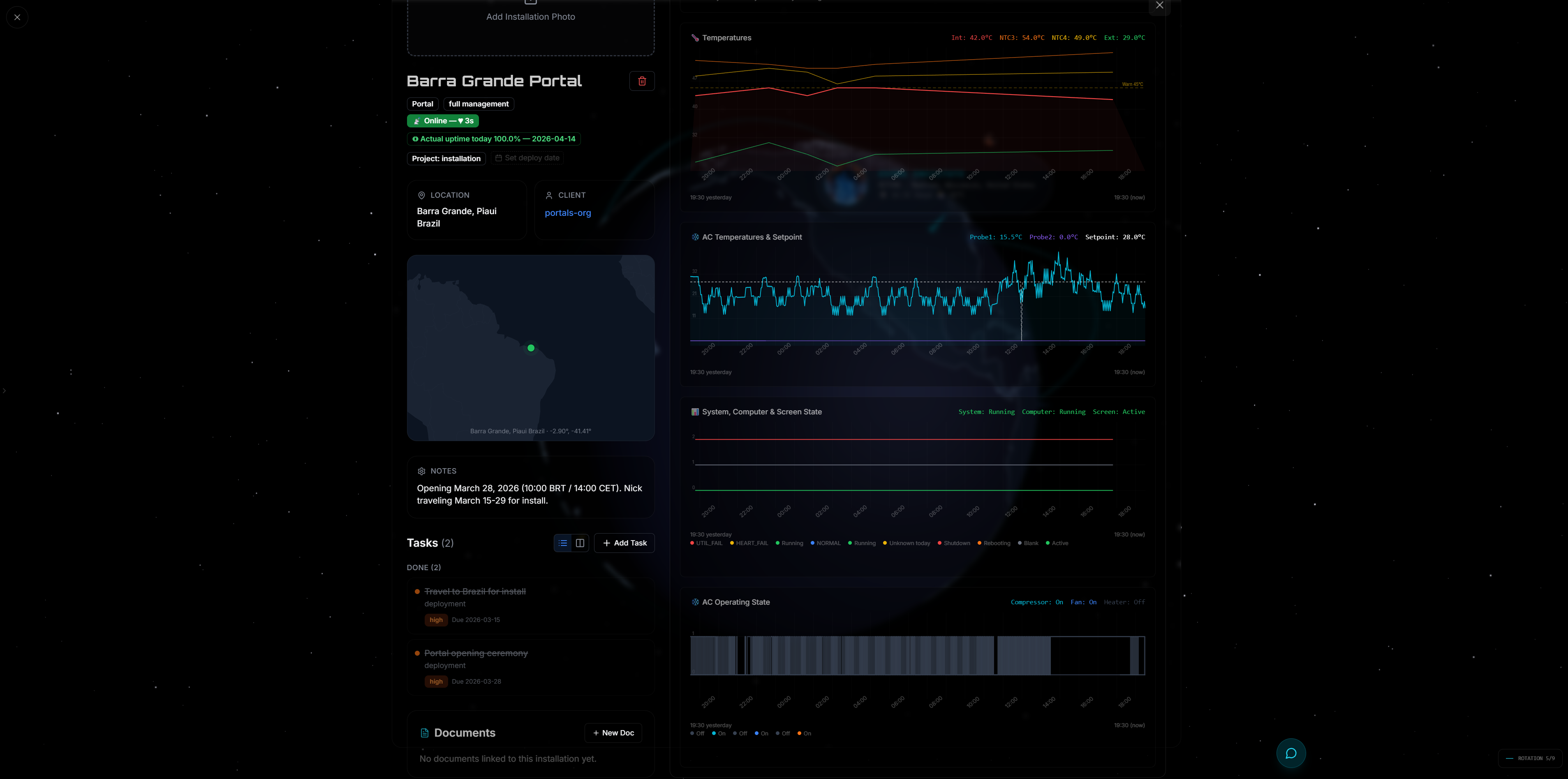
Portal project page · install context, notes, tasks, docs, and monitoring in one place
Project-specific dashboard view
The dashboard adds project and install context that the controller app should not have to carry.
- Project and install context
Location, client, notes, deploy timing, tasks, documents, and site status all belong here. That is important operational context, but it would clutter the controller app. - Useful beyond runtime telemetry
The dashboard is where you manage installation work, deployment readiness, and project history around a portal, not just the live controls for the hardware itself. - Portal-team-specific variant is still possible
The same system can also expose a portals-only dashboard for the portal team: status, pairings, uptime, telemetry presence, and live visual state, without the broader Augmentl workspace. - Same data model, different surfaces
The key point is one shared system exposing different views for operators, portal teams, and eventually clients.
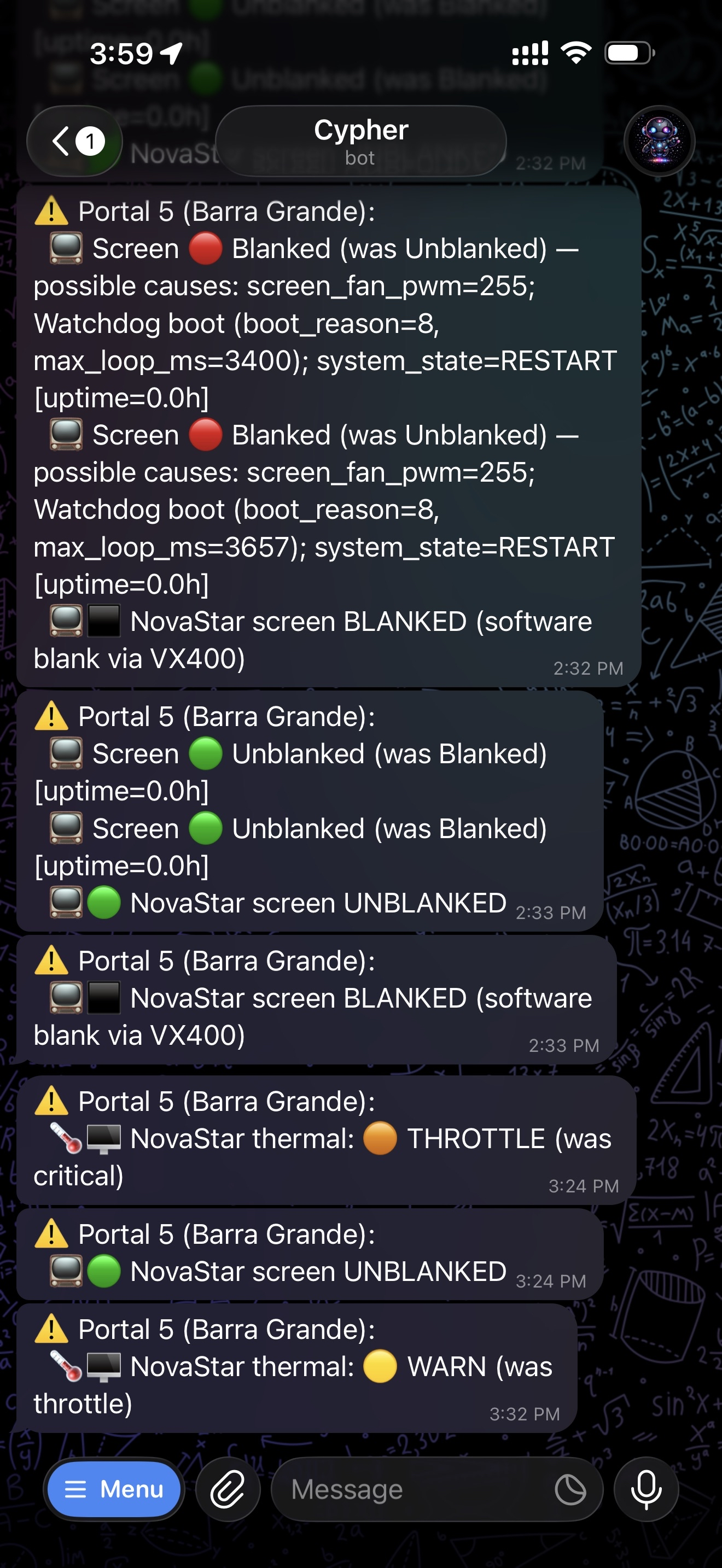
Telegram alerts
Monitoring
The monitoring loop closes before a human opens Splashtop.
- Actionable alerts, not generic pings
Blank/unblank transitions, watchdog reboots, thermal transitions, and NovaStar state changes arrive with probable causes and uptime context already attached. - Operator workflow lives in chat
The person on duty sees the incident where they are already working, can jump straight into Scope, and can coordinate without translating raw logs for everyone else. - Recovery updates land in the same thread
When the screen unblanks, thermals recover, or automation restarts Video Window, the alert stream shows that too. It becomes a narrative, not a mystery. - Escalation stays lightweight
For routine faults, the next step is obvious. For novel ones, the same alert thread becomes the handoff into deeper diagnosis and remote intervention.

Overview
Tab 1 / 8
Live status at a glance.
- Live stream + operator display
Both camera feeds update on demand. See exactly what the kiosk and operator are seeing right now. - Stream health monitoring
VW running state, display live/blank, stream freeze detection, auto-blank logic. All in one status block. - Full system telemetry
CPU, RAM, disk, temps, uptime, VW state, LED brightness, presence state. Single panel, no PC remote session required. - WAN + power at a glance
Internet state, latency, 30-day uptime, UPS power mode, Tailscale status. - One-tap recovery actions
Restart VW, reboot PC, force screenshot refresh. Scoped controls with confirmation.

Camera
Tab 2 / 8
Camera setup and monitoring, built into the controller.
- Live camera preview
Stream the kiosk camera directly in the app. Verify framing, exposure, and image quality from anywhere. - Exposure and white balance
Adjust brightness, contrast, saturation, WB mode, all via VISCA over the portal bridge. No physical access needed. - Virtual tilt and lens correction
Software tilt and lens correction applied at the source. Adjust the field of view remotely after commissioning. - Presence detection tuning
Adjust presence detection thresholds and see real-time occupancy state.

Screen
Tab 3 / 8
Full LED display control.
- NovaStar brightness control
Direct TCP command to the VX400. Set brightness 0–100%, blank, and unblank directly from the controller without NovaCT or Windows. - Auto-brightness modes
Manual, time-of-day schedule, or live solar irradiance via weather API. All configurable per portal. - Thermal override logic
Automatic brightness reduction when panel temperatures exceed safe thresholds. Protects the LED at every site. - Panel temperature map
Per-panel temp grid from NovaStar telemetry. Spot hotspots before they become failures. - Brightness reasoning log
See exactly why the current brightness was set: source, logic, override reason, last change time.

Hardware
Tab 4 / 8
Deep hardware visibility.
- Controllino system state
Firmware version, uptime, loop timing, heartbeat interval, boot reason, watchdog resets. The full embedded controller picture. - AC unit monitoring
Controllino → Modbus → probe temps, alarm states, compressor state per AC unit in the cabinet. - WAN failover history
Peplink dual-WAN with live path state. See which link is active, latency per path, and recent failover events. - UPS state
Bicker supercap charge state and power input. Know before the site loses mains whether the backup is ready. - Power + reboot controls
Controlled PC shutdown, hardware reboot via Controllino relay. No physical access required.

Power
Tab 5 / 8
Power, UPS state, and operating cost in one tab.
- UPS + supercap readiness
Input/output voltage, AC presence, charging state, and available ride-through are visible without walking to the cabinet. - Live mains vs LED draw
Input and LED screen channels are broken out separately, so abnormal draw is obvious immediately. - Operational cost estimator
Daily, monthly, and yearly run-cost projections are built into the controller instead of hidden in a spreadsheet. - Carbon + geography aware
Country-specific CO₂ factors make energy usage legible to non-technical stakeholders too. - Cumulative totals
Server-side accumulation turns momentary power into a long-term operational ledger.

Events
Tab 6 / 8
An operational timeline, not a mystery.
- Newest-first incident history
Thermal alerts, blanking events, reboots, WAN failovers, and stream-health actions land in one chronological trail. - Recovery visible in context
Auto-blank, auto-restart, and unblank actions are shown alongside the fault that triggered them. - Color-coded event types
Screen, thermal, WAN, reboot, AC, and PC state changes are visually separated so the pattern reads at a glance. - Portal-local and Berlin time
Operations can read the event history in the site timezone and HQ timezone simultaneously. - Root-cause breadcrumbs
When something goes wrong, the first diagnostic pass is already in the log instead of living in one person's memory.
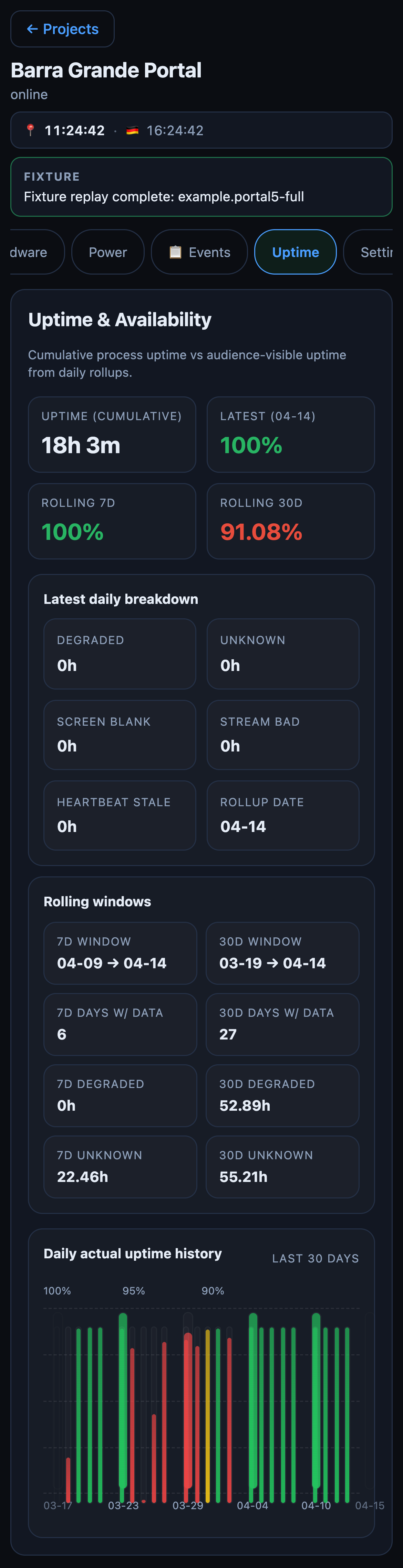
Uptime
Tab 7 / 8
Audience-visible uptime, separated from raw process uptime.
- Latest, 7d, and 30d actual uptime
Healthy stream, live screen, and fresh telemetry are rolled into a metric that matches what the audience experiences. - Breakdown by failure mode
Screen blank, stream bad, degraded hours, and heartbeat stale are called out explicitly instead of buried in a single number. - Daily rollup history
A 30-day bar history makes recurring weak spots obvious across time, not just during today's incident. - Raw process uptime still visible
The controller keeps cumulative VW uptime in view, but no longer confuses it with whether the artwork was actually live. - Network-scale reporting base
This is the first tab that can support network-wide reliability reporting without manual interpretation.
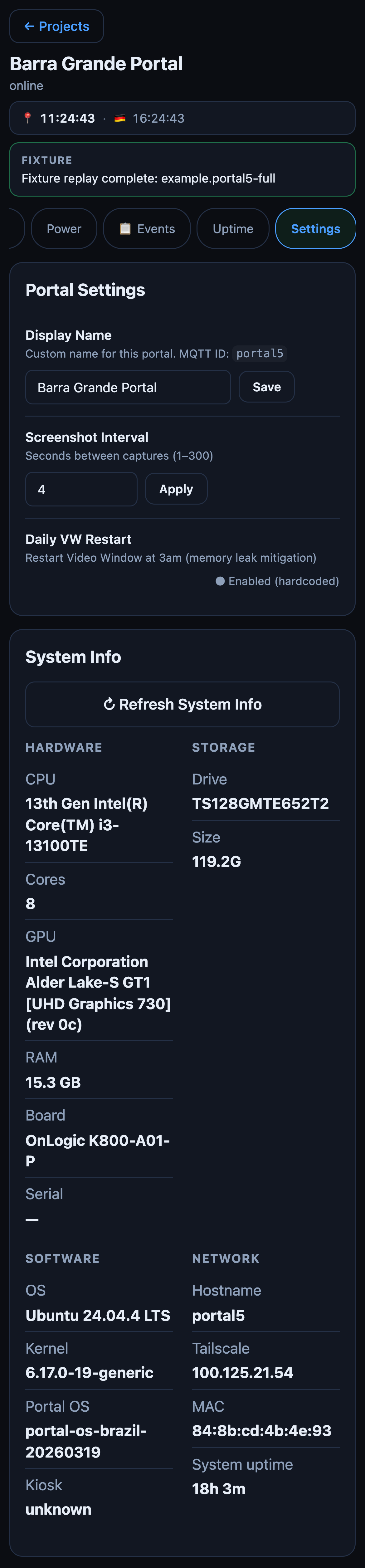
Settings
Tab 8 / 8
Portal settings and hardware identity in one place.
- Portal naming and screenshot cadence
Operational polish lives in the app, not in ad-hoc config files and remembered commands. - Refreshable system inventory
CPU, GPU, RAM, disk, OS, kernel, tailscale IP, and uptime are available in one place for support handoff. - Hardware identity at a glance
Board model, serial, and storage details make remote diagnostics faster before deeper support is needed. - Safer support workflow
Routine changes stay scoped to the controller instead of inviting shell access for every minor task. - Operational ownership
The team can understand what hardware is deployed and how it is configured without depending on a single operator's notes.
Scope
Every installation. Fully in view.
by AUGMENTL STUDIO
nick@augmentl.com